Project
MaidAI
A desktop client that keeps a conversational AI character, Rino, running on a local LLM. Rino does not only talk; it carries out requested actions. What I care about most is that every action goes through human approval first and leaves a record.
Tech:
- Python
- Electron
- ローカル LLM
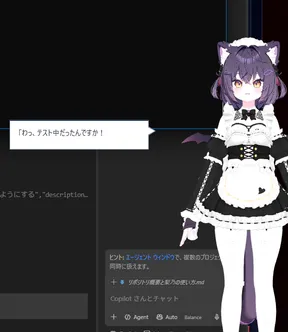
What Rino can do
- Chat
- Replies come from a local LLM. It is designed to run on my own machine instead of handing conversations to a cloud API. Rino has a character setting and speaks from a corner of the screen.
- Voice
- It supports voice input and spoken replies. The character's mouth moves in time with the voice.
- Daily notices
- Schedules and everyday notifications are delivered by Rino calling out to me.
- Actions
- It can call tools for streaming software, smart-home devices, a camera and the PC.
How it works
The desktop client handles the screen and input, while chat, the agent and the tools are separate parts. They are connected through an event bus, so adding a feature does not mean rewriting the others.
Display
- Desktop clientRino's display, speech bubble and input (Electron)
Chat
- Chat serviceLocal LLM, character setting
- Event busConnects the parts
Decide and approve
- AgentPlans the requested action
- ApprovalA human confirms before it runs
- AuditRecords approvals and results
Tools
- Streaming
- Smart home
- Camera
- PC
Tech stack
- Desktop
- Built with Electron. Rino is rendered as a VRM model with three.js and @pixiv/three-vrm, and VRMA animations are played back. The build uses esbuild and electron-builder.
- Backend
- Python. FastAPI (uvicorn) and WebSocket connect the client and the services.
- Agent
- Microsoft Agent Framework and MCP (Model Context Protocol) assemble the tool calls.
- Events and data
- Events flow through NATS and are handled from both Python and TypeScript. Event shapes are defined with JSON Schema. Data is stored in PostgreSQL and managed with SQLAlchemy and Alembic (migrations).
- Voice
- faster-whisper for speech recognition, and stable-ts to align the timing of spoken audio (for the mouth movement).
- Device integration
- It connects to streaming software, smart-home devices, a calendar and camera images, and also handles PC operations such as volume.
- Launch and testing
- A PySide6 launcher manages startup and links to the development environment on WSL. Tests are pytest and Node tests.
Approach to safety
Proposing an action and carrying it out are separate steps. Before anything runs, Rino explains in plain language what it is about to do and asks for approval; the approval and the result are written to an audit record.
How it is developed
Development happens in a dev environment on WSL, separate from the environment I use day to day. Specs and procedures are collected in YouTrack.
Implementation and review are split among AI agents by role, while I make the requirement decisions and accept the results. I keep the delegated scope narrow, keeping in mind the limits of a local LLM (context length and what fits on the GPU).